New · Shopify integrated in Excel

All your data.
In Excel. No coding.

Connect your crypto exchanges, your Shopify store, and soon more. Build queries in a visual editor — your data appears in the active cell, in one click.

Microsoft AppSource add-inNo formula to write
XPortfolio_Q2.xlsx — LinkyFlow
FichierAccueilFormulesDonnées⚡ LinkyFlow● Live
D4ƒx=LFS.PRICE("BTC", "binance")
A
B
C
D
E
F
1
Asset
Exchange
Price
Value €
24h
P&L
2
BTC
Binance
97 432
82 037
+2.4%
3
ETH
Coinbase
3 218
36 042
−1.1%
4
SOL
Kraken
184
26 248
+5.8%
5
USDC
OKX
0.92
38 640
+0.0%
6
DOT
HTX
7.84
25 088
−0.7%
7
TOTAL
€ 208 055
+1.9%
+€ 14 858
PortfolioShopify_OrdersTradesSynchro · 0,3 s

CONNECT YOUR TOOLS — ONE INTERFACE, MULTIPLE WORLDS

Crypto exchanges9 connectors
BinanceCoinbaseOKXBybitHTXBitget+ 3
E-commerce1 platform
Shopify
Coming soonRoadmap 2026
StripePayPalWooCommerce+ more

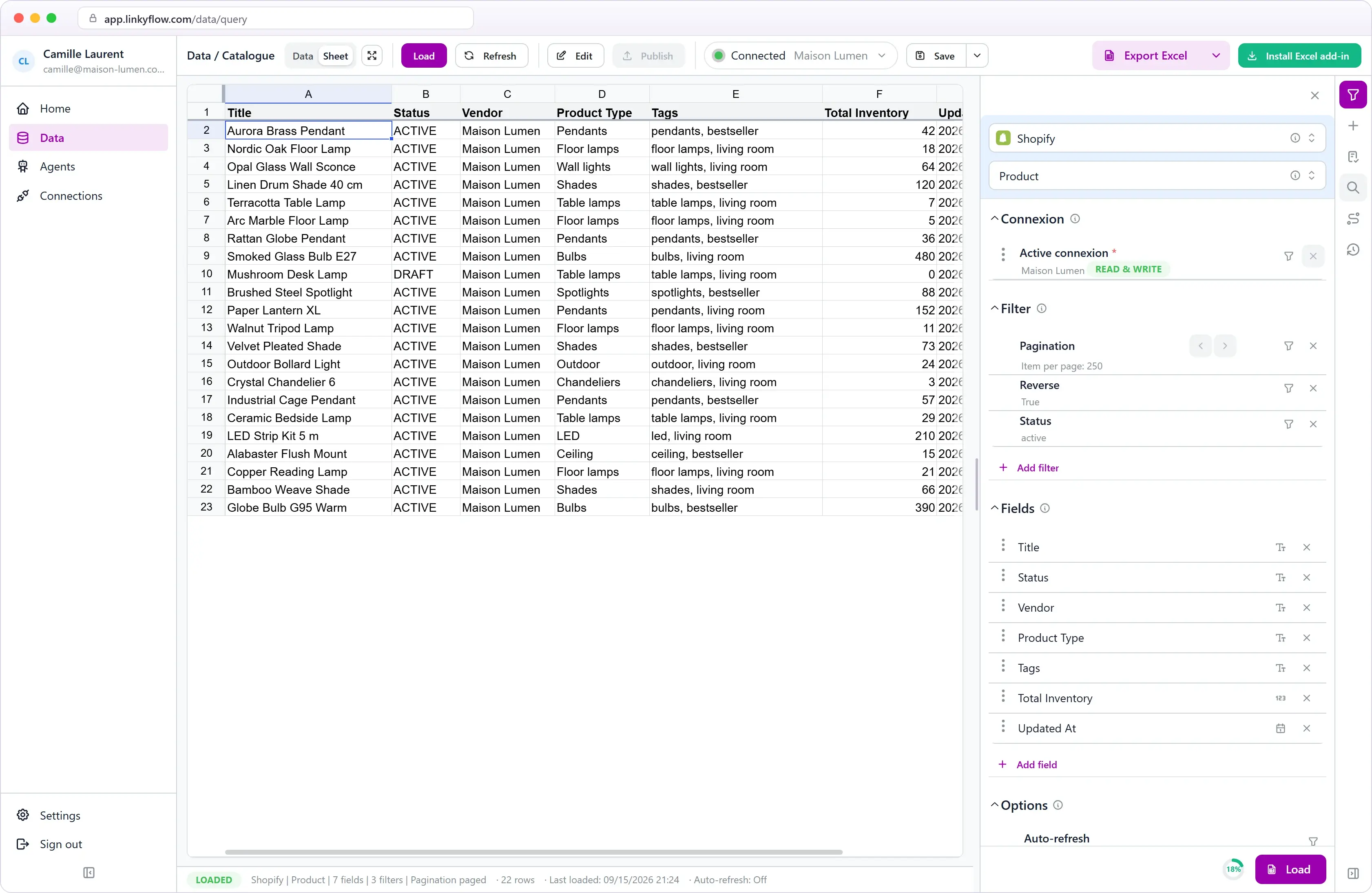
Build your query. Not a formula.

The LinkyFlow taskpane opens inside Excel. You pick the source, what you want to fetch, filters and columns — click Load, and a ready-to-use table appears in your sheet.

ShopFlow
Query
Shopify
Product
▾ Select
Link*quickstart-8504b8b4.myshopify.com
Statusactive
Pagination250 / page
+ Add filter
LOADED
1

Pick your source

Binance, Coinbase, Shopify, or any available integration. The taskpane knows what to offer for each.

2

Ask your question

"Active products", "orders from the last 30 days", "all wallet balances". A Query = a business intent, not an API URL.

3

Filter & select columns

Pagination, sort, status, dates — add filters. Pick exactly the columns you want in Excel.

4

Click Load →

The table appears in the active cell, ready for pivots, charts and formulas. One-click refresh.

⚡ ShopFlowSheet1A1:E6 inséré250 lignes · 4 colonnes
Title
Created At
Type
Inventory
Status
1
The Multi-managed Snowboard
2026-04-12
Snowboard
42
active
2
The Collection Snowboard
2026-04-12
Snowboard
18
active
3
The Inventory Not Tracked
2026-04-12
Accessories
active
4
The Hidden Snowboard
2026-04-12
Snowboard
7
active

Crypto. E-commerce. And more.

You don't need one app for your portfolio, another for your store. One interface, multiple worlds — everything in the same sheet.

LINKYFLOW · CRYPTO

Your exchanges in the sheet.

Portfolio tracking, FIFO P&L, allocation dashboards, tax reporting — all from Excel, across 9 exchanges in parallel.

  • Consolidated portfolio: Binance, Coinbase, OKX, Bybit…

  • Transaction history + cost basis

  • Order books, live prices, OHLCV for backtests

  • Trading from Excel (trade API key enabled)

SHOPFLOW · E-COMMERCE

Your Shopify store in formulas.

Products, variants, orders, customers, inventory — all Shopify resources exposed as simple queries.

  • Product catalog with columns of your choice

  • Filterable orders: date, status, source

  • Multi-location inventory in real time

  • Monthly accounting report without CSV export

See ShopFlow

+ more e-commerce integrations coming

ON THE ROADMAP

StripePayPalWooCommerceStocks & ETFBanking+ more

Three superpowers. Excel's infinite canvas.

We don't invent a new tool. We give Excel what it never had: direct access to the live data of all your platforms.

01 · DATA

Live data, in the cell

Crypto prices, exchange balances, Shopify products, orders — each resource becomes an Excel table that updates itself.

Binance · Wallets14 rows
Coinbase · Transactions82 rows
Shopify · Products250 rows
Shopify · Orders (30d)412 rows

02 · NO-CODE

Visual query builder

Provider, query, filters, columns — point and click. No API docs to read, no formulas to memorize.

ProviderShopify
QueryProduct
Active filters4
→ Load250 ✓

03 · AUTOMATION

Refresh, formulas & orders

One-click refresh or on a schedule. =LFS.… syntax for composition, and crypto trading directly from the sheet.

Scheduled refresh↻ 5 min
=LFS.PRICE("BTC")97 432
=LFS.BUY("ETH",0.5)✓ filled
VBA & Office Scriptsok

Not another app. The tool you already master.

Portfolio apps, Shopify dashboards, reporting tools all want you to adopt their logic. Excel adopts yours.

1.1 Bn

Excel users worldwide — the largest calculation surface ever created.

0 files

to export, re-import, reformat. Your data is in the cell when you want it.

∞ workflows

VBA, Power Query, Power Pivot, Office Scripts — keep everything you already know.

From zero to first dashboard.

No painful sign-up. No SDK. No webhook. Install, paste a key, load a query.

STEP 01

~15 s

Install the add-in

Microsoft AppSource or the "Install for Excel" button — works on Desktop & Web.

STEP 02

~45 s

Connect your source

Exchange API key (read-only by default), Shopify domain + token. The wizard guides you step by step.

STEP 03

~30 s

Load your first table

Pick your query in the builder, add filters and columns, click Load. That's it.

Start free. Scale when you need it.

No commitment. Start with market data, activate trading when you want.

Free

Start with refreshable exchange data inside Excel.

0

per month

Access to crypto exchange market data

Market data refresh every 5 minutes

Access to 1 user wallet

Create SPOT orders up to 200€ per month for 1 user wallet/exchange

Premium

Premium

Faster refreshes and more wallets for active spreadsheet workflows.

9.99

per month

Access to crypto exchange market data

Market data refresh every 10 seconds

Access to 5 user wallets

Create SPOT orders up to 10,000€ per month across different wallets

Subscribe

Pro

Real-time market data and higher limits for teams that run Excel as an operations workspace.

Access to crypto exchange market data

Real-time market data (websocket)

Unlimited wallets

Create SPOT orders up to 500,000€ per month

Frequently asked questions.

Which platforms are already supported?

Nine crypto exchanges (Binance, Coinbase, OKX, Bybit, HTX, Bitget, Gate.io, MEXC, Upbit) and Shopify. Stripe, PayPal, WooCommerce and more are on the 2026 roadmap.

Are my API keys / tokens safe?

Yes. You create read-only credentials on your platform. LinkyFlow cannot modify your data or trigger withdrawals. Secrets are encrypted server-side and never seen in plain text.

Does it work on Excel Mac and Excel Web?

Yes. Any add-in through AppSource is cross-platform: Windows, macOS, iPad, Excel for the web. The taskpane and functions are identical.

Can I cross-reference crypto and Shopify data in the same sheet?

Yes — that's actually why we built it. Load your Binance query in one tab, your Shopify query in another, and cross them with any Excel formula.

Can I automate advanced workflows?

Yes — via =LFS.… syntax, by combining formulas with Office Scripts, or with VBA.

Your next sheet fills itself.

Install LinkyFlow for free, connect a source, and watch your data populate in under 90 seconds — without writing a formula.