
 Shopify
 Stripe
Shopify + Stripe Reconciliation Agent
The LinkyFlow Shopify + Stripe Reconciliation Agent compares every Shopify transaction paid through Stripe with the actual Stripe payment — amount, currency, status, fee and net amount — once an hour, and opens a case for each sale that does not reconcile. It is read-only: it never changes anything in Shopify or Stripe.
Sign in or create your LinkyFlow account, then set this agent up.
How the workflow works
What this agent does
Shopify
- Each transaction paid through Stripe
- Expected amount and currency
- Payment status and recorded refunds
Stripe
- The payment exists on the connected account
- Status: succeeded, pending or failed
- The real fee and net amount
Result
- Reconciled only when an identifier proves the pairing
- Pending payments checked again
- Every discrepancy becomes a case
Examples
What the agent returns in real situations
1. Clean match
RECONCILED
- Shopify
- Order #10582 · €149.90 · paid via Stripe
- Stripe
- €149.90 · succeeded
- Fee
- €3.72 · net €146.18
Reconciled, with the real fee and net amount recorded. Nothing to investigate.
2. Missing payment
NOT_FOUND
- Shopify
- Order #10598 · €129.90 · paid via Stripe
- Stripe
- No payment with that identifier
- Case
- Opened, then rechecked automatically
Often a payment made on another Stripe account, or one captured later — in that case the agent closes it by itself on a later run.
3. Amount mismatch
AMOUNT_MISMATCH
- Shopify
- €149.90
- Stripe
- €144.90
- Difference
- €5.00
The exact difference is reported so you can investigate it.
Every possible result
| Result | What it means |
|---|---|
| RECONCILED | The Stripe payment was found by its identifier, it succeeded, and the amount and currency match. The fee and net amount are recorded. |
| PENDING | The payment exists and has not settled yet. Nothing is wrong; it is checked again on the next run. |
| NOT_FOUND | Shopify recorded a payment that does not exist on the connected Stripe account. |
| AMOUNT_MISMATCH | The payment exists and is for a different amount. The difference is reported exactly. |
| CURRENCY_MISMATCH | The payment exists in a different currency, so the amounts cannot be compared. |
| PAYMENT_FAILED | The payment did not go through — Shopify or Stripe recorded it as failed. A sale Shopify declined is never reported as reconciled, even if a Stripe charge for it succeeded. |
| REFUND_MISMATCH | Stripe gave the money back and your store still records the order as paid. The case closes by itself once the refund is recorded in Shopify. |
| NEEDS_INVESTIGATION | The evidence is ambiguous — for example several Stripe payments of the same amount at about the same time, with nothing tying one of them to this sale. |
What you can do with the results
From result to action
Review the case
See what Shopify said, what Stripe said, the amounts, why the case was raised and the candidate payments that were rejected.
Open in Excel
Refresh current reconciliations, open exceptions, runs or the detail of a past run in a live workbook.
Run again now
Start a reconciliation on demand instead of waiting for the next hourly run.
Ask an assistant
Ask ChatGPT or Claude, through LinkyFlow MCP, why an order did not reconcile or how much you paid in Stripe fees.
Read-only by design
The agent never refunds, captures, edits an order or changes anything at Shopify or Stripe — it holds no write access to either. It reads, reconciles and reports, and a case closes by itself when the evidence changes.
Capabilities
- Read-only
- Runs every hour
- Runs on demand
- Incremental: re-reads only what changed
- AI only on ambiguous cases
- Live Excel workbook views
- ChatGPT and Claude, via MCP
What is the Shopify + Stripe Reconciliation Agent?
Most reconciliation is a spreadsheet somebody rebuilds every month: export the Shopify orders, export the Stripe payments, line them up, and try to work out which four rows are wrong. The Shopify + Stripe Reconciliation Agent does that continuously, on its own, and tells you only about the rows that need you.
It works at the level of transactions, not order totals. That matters more than it sounds: one Shopify order can carry an authorisation and a later capture, two partial payments, or a sale through one gateway and a refund through another. An order total says nothing about any of them, which is exactly why reconciling against it looks right and is not.
Which connections does it need?
- Shopify — to read your orders and their payment transactions.
- Stripe — to read the matching payments, refunds and what they actually cost.
You do not have to connect them first. Add the agent whenever you like: if a connection is missing it waits, and it starts by itself within the hour once the connection is there. You type your keys on LinkyFlow, in the same connection form as everywhere else — never in a chat.
If a connection exists but cannot be used — switched off, never verified, or its key revoked — the agent says that instead, and points at the fix. It will not ask you to connect Stripe twice.
When is a sale reconciled?
A sale is only ever marked RECONCILED when something proves the pairing: the Stripe identifier Shopify recorded on the transaction, or a reference in the Stripe payment itself naming the order. A payment of the right amount at the right moment is a good candidate and is never treated as a match.
Transactions settled through another gateway are counted and skipped: they are not this agent's business, and reporting them as problems would bury the ones that are.
How does the agent run?
- Automatically, once per hour. Nothing to trigger and nothing to watch.
- Not in real time. There is no webhook: a sale made at 10:05 is reconciled during the 11:00 run, or as soon as you ask for one.
- On demand too. You can start a reconciliation at any moment without waiting for the hour.
The first run reads as far back as your Shopify connection is allowed to see, catching up over several runs if the store is large. Every run remembers where it got to, so nothing is read twice and nothing is skipped.
It does not re-read your history every hour
After that first scan, each hourly run looks at three things: Shopify sales that have been created or changed since the last run, new Stripe records, and unresolved cases that are due another look. Everything else is left alone.
"Changed" is the important word. An order from January that you refund this morning is not a new order — but it is a change, and the agent finds it. A tool that only watched for new orders would report that sale as reconciled for ever.
Initial scan
12,420 historical transactions

A normal hourly run
18 Shopify changes
21 Stripe changes
3 unresolved cases rechecked
→ 22 unique sales processed
Those numbers do not add up, and that is correct: the same refunded sale usually appears in more than one of them, and it is processed once. Settled, unchanged sales cost nothing at all.
Unresolved cases are not polled forever at the same rate either. A discrepancy is rechecked every hour for its first two days, every six hours until it is a week old, and once a day after that. Nothing is ever dropped: a payment that turns up three weeks late still closes its case by itself. Once a day the agent also re-reads the last week as a safety net, in case a provider reported something late.
Exceptions are cases, not alerts
Everything that does not reconcile becomes a case you can follow, not a line in a log. The same problem seen every hour is one case with a count, not twenty-four copies — and when a later run finds what was missing, the case closes itself and says so.
Each case carries what Shopify said, what Stripe said, the amounts, why it was raised, and the candidates that were considered and rejected. That is enough to understand it without going back to either provider.
How is AI used?
- Normal matching is deterministic. It is identifiers and arithmetic, done in code, the same way every time.
- AI is not used for every transaction. A run over ten thousand clean sales calls no model at all.
- AI is only invoked for ambiguous cases — the ones marked NEEDS_INVESTIGATION, where several payments could plausibly be the counterpart and nothing decides between them.
- AI conclusions do not replace financial evidence. An investigation can suggest a candidate and explain what it found; it can never turn an ambiguous transaction into a reconciled one. If the model is unavailable or answers something unusable, the case stays exactly as the deterministic checks left it.
- The same case is not investigated twice unless its evidence actually changes.
Reviewing results in Excel
Four views are available, and they are all live queries rather than exports — a workbook you saved last week refreshes to today's numbers:
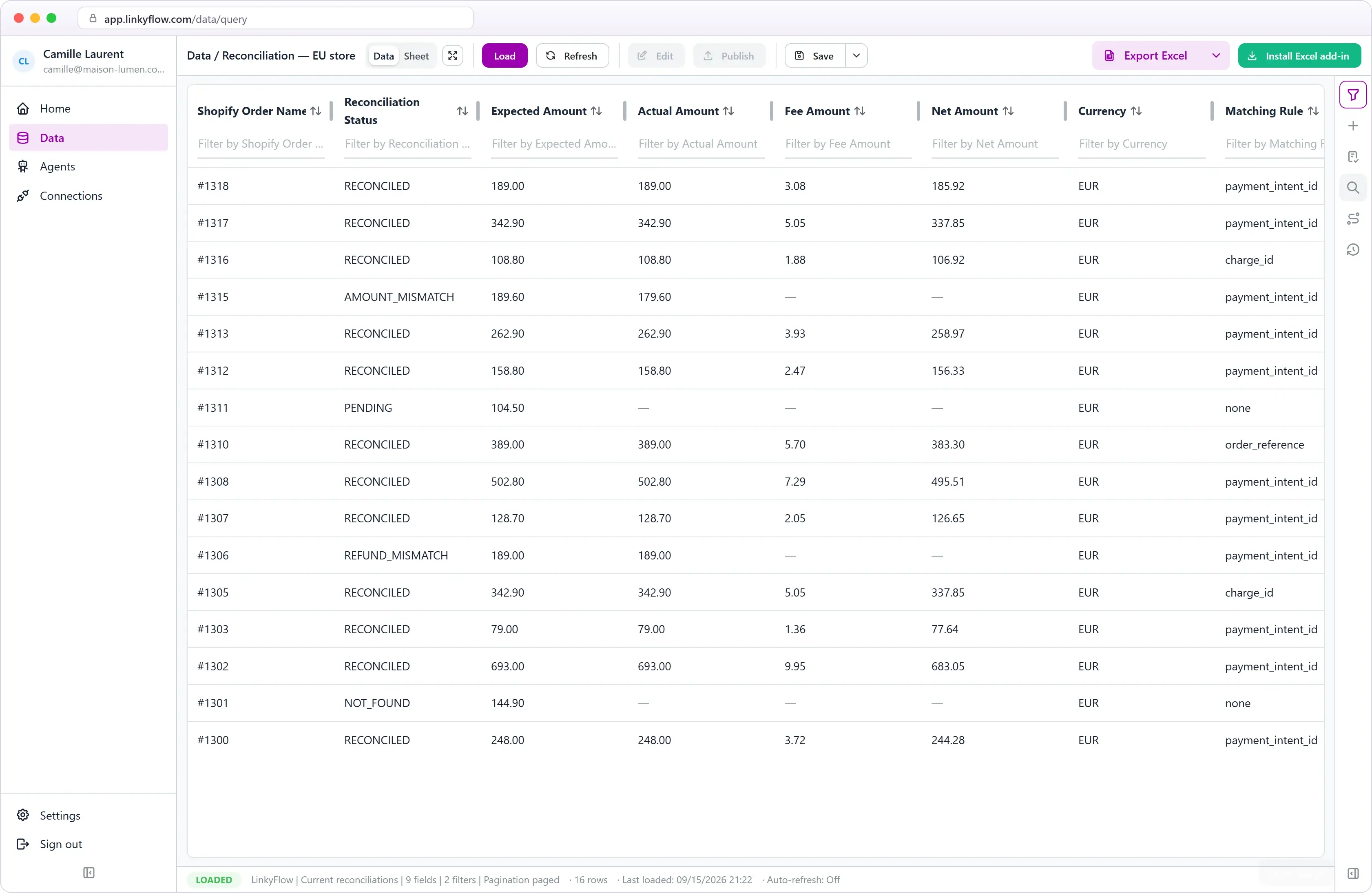
- Current reconciliations — where every sale stands right now: the Shopify order and transaction, the Stripe payment, the expected and actual amounts, the gross, the Stripe fee and the net, the status and how the match was made.
- Open exceptions — the cases that need you. A case resolved by the next run disappears from this view when you refresh.
- Runs — one row per run, with what it read, what it concluded and what it cost in fees.
- Historical run detail — the rows of one specific run.
A historical run is an immutable snapshot of what LinkyFlow concluded during that run: refreshing it a month later shows the same thing. Current reconciliations always shows the latest known state. "What did we conclude on 6 September?" is the first question; "which of my sales still do not reconcile?" is the second.
Detailed run data is kept for 30 days. After that, a run's summary and your current reconciliations are still there — only its row-by-row detail is gone, and LinkyFlow says so rather than showing an error.
Asking ChatGPT or Claude
With LinkyFlow connected to ChatGPT, Claude or any MCP client, you can ask:
Run my Shopify reconciliation now.
How many sales reconciled in the latest run?
Show me my open reconciliation exceptions.
How much did I pay in Stripe fees?
Why did Shopify order #10582 fail to reconcile?
Current limitations
- Stripe only. Shopify transactions settled through any other gateway are counted and skipped, not reconciled. PayPal, bank reconciliation and payouts are not part of this agent.
- Hourly. There is no webhook and no real-time processing.
- Read-only. The agent never refunds, captures, edits an order or changes anything at Shopify or Stripe.
- Historical coverage depends on Shopify. Without the
read_all_ordersscope, Shopify serves the last 60 days of orders. The agent records how far back it can actually see rather than implying the rest of your history reconciled. - Detailed run data is kept for 30 days. Run summaries and your current reconciliations stay.
Next steps
Frequently asked questions
Does the agent change anything in Shopify or Stripe?
No. It is read-only: it never refunds, captures or edits an order, and it holds no write access to either account. It reads, reconciles and reports.
How often does the reconciliation run?
Automatically once per hour, and on demand whenever you ask. There is no webhook, so a sale made at 10:05 is reconciled during the 11:00 run.
Which Shopify payments does it reconcile?
Transactions settled through Stripe. Transactions paid through another gateway — PayPal, Shopify Payments, a manual payment — are counted and skipped, not reconciled.
When is a sale marked as reconciled?
Only when an identifier recorded on the transaction, or a reference in the Stripe payment naming the order, proves the pairing. A payment of the right amount at the right time is only a candidate.
Is AI used on my transactions?
Only on ambiguous cases marked NEEDS_INVESTIGATION. Normal matching is deterministic code, and an AI answer can annotate a case but can never turn it into a reconciled sale.
How far back does the agent look?
As far back as Shopify serves your connection: without the read_all_orders scope, that is the last 60 days of orders. The agent records how far back it could actually see.
Related agents
- Shopify
 WooCommerce
 eBay
eBay BigCommerce
Inventory Stock Sync Agent
Keeps stock quantities in step across your stores, with one master store as the only source of truth.
- One master store, one or more targets
- Exact SKU matching, never guessed
- Guard-rails and a read-back on every write
Launch this agent
Add it to your LinkyFlow account in a few steps. It starts running as soon as its setup is complete.